
Prologue
Last time (ages ago) I showed how to dockerize a PHP/Laravel application by using Docker and Docker Compose. Thing is, I showed how you can open ports for each of your projects, but to be honest, that is not very practical. What I noticed is that each time I created a new project that was gonna work through containers, no matter the underlying technology (whatever it is, PHP, Python, Go etc.), there is always the need to remember the ports. And I always forgot the existing apps used same existing ports that I had lying in some other project.
So what do I do?
Since I had some previous experience with Api Gateways in Kubernetes (with Apisix and Kong), I thought I'd use that to my advantage. But I needed something simple, lightweight and just right for my local development use case. So I chose Traefik and Docker Compose with "advanced" docker networking to properly expose and isolate my projects and their moving parts.
General architecture
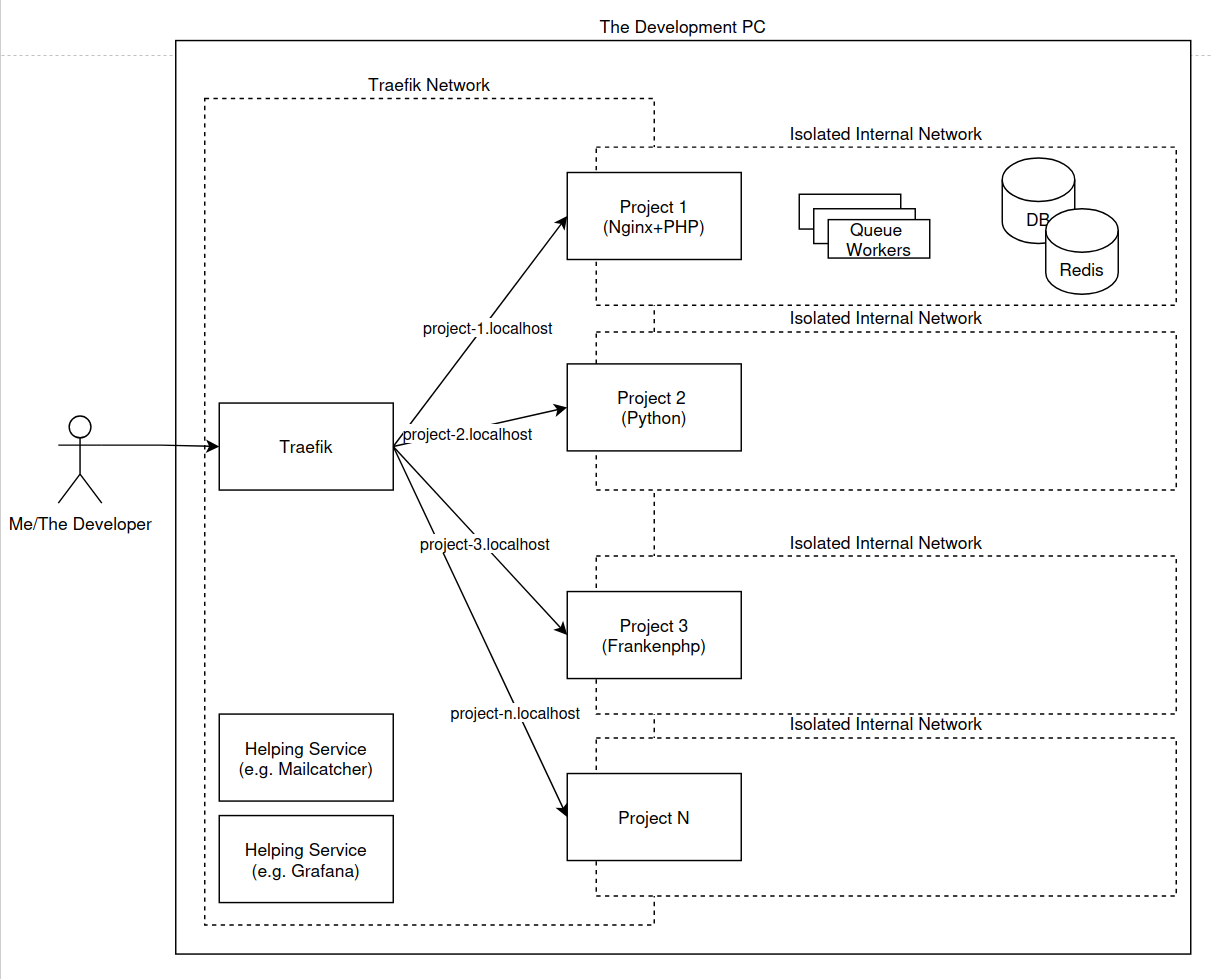
In my previous setup, that the minority who use containers also have, I use a docker compose file per project and nothing more. In my current setup, I have a main docker compose yml file that acts as a proxy and common setup for common services (like Mailcatcher, single DB maybe, Grafana, Prometheus etc. ) with its own network.
So, the main service in this docker compose yml file is a Traefik service running in front of each of the containers for each of my projects. Each container/service that I want to expose for each project is always on 2 networks, the internal network in its own docker compose yml file and the main "traefik" network. This way, when I need to have a service called "db" in each project, it's name resolution will never conflict with other "db" containers from other project/service.
Note: When I initially did try to set this up, I set everything in the same "traefik" network and got random connections from php to random "db" containers in the different docker compose yml files because of how docker containers resolve the same name in the same network
Global Docker Compose file
A simplified version of my global docker-compose.yml file is this:
services:
	traefik:
		image: "traefik:v2.11"
		container_name: "traefik"
		command:
			- "--log.level=DEBUG"
			- "--api.insecure=true"
			- "--providers.docker=true"
			- "--providers.docker.exposedbydefault=false"
			- "--entrypoints.web.address=:80"
		ports:
			- "80:80"
			- "8080:8080"
		volumes:
			- "/var/run/docker.sock:/var/run/docker.sock:ro"
		restart: always
		networks:
			- traefik
	whoami:
		image: "traefik/whoami"
		container_name: "simple-service"
		labels:
			- "traefik.enable=true"
			- "traefik.http.routers.whoami.rule=Host(`whoami.localhost`)"
			- "traefik.http.routers.whoami.entrypoints=web"
		volumes:
			- "/var/run/docker.sock:/var/run/docker.sock:ro"
		networks:
			- traefik
networks:
	traefik:
		driver: bridge
		name: traefik
		attachable: true
So here we have a single network that is called "traefik" and two services. One service is the main "traefik" service and then we have another one called "whoami" for testing purposes to see if Traefik works properly.
The "traefik" service exposes 2 ports, one is port 80 for all the projects that we want to expose through a domain name and the other is 8080 in order to access the Traefik dashboard (through http://localhost:8080/dashboard/ url). It is connecting to docker through the docker.sock volume and watching docker's running services and their labels through which Traefik registers them in its routers.
So for example, in the testing service "whoami", we are adding these labels:
- "traefik.enable=true"
here we enable traefik for this service.
Next
- "traefik.http.routers.whoami.rule=Host(`whoami.localhost`)"
we set Traefik to create a router that will accept the host "whoami.localhost" and will proxy the this domain through browser or api call to the "whoami" service. Note that you need to add the "whoami.localhost" domain name into your "hosts" file on your operating system (or have a dns service installed on your pc).
Next we tell it that we need to use the "web" entrypoint which means it will listing on port 80 through that same domain name (whoami.localhost:80 if you will):
- "traefik.http.routers.whoami.entrypoints=web"
If for some reason the underlying service uses a separate hosts, like port 3000 for Node services, we can also add a load balancer label that will tell it to proxy to the port 3000:
- "traefik.http.services.whoami.loadbalancer.server.port=3000"
Each Project's Docker Compose file sample
So let's say I have a simple static html website, that has a single index.html file with this content:
<html>
<body>
<h1>Project 1</h1>
</body>
</html>
and we want to serve it through Nginx, but we don't want to expose a port for it. Here I would use this docker-compose.yml file:
services:
	web:
	    image: nginx:latest
	    volumes:
	        - .:/usr/share/nginx/html:ro
	    labels:
	        - "traefik.enable=true"
	        - "traefik.http.routers.project_1.rule=Host(`project-1.localhost`)"
	        - "traefik.http.routers.project_1.entrypoints=web"
	        - "traefik.docker.network=traefik"
	    networks:
	        - internal
	        - traefik
networks:
    internal:
        external: false
    traefik:
        external: true
What's happening here is that it is registering the service with Traefik host "project-1.localhost". Since this docker compose file is part of the same "traefik" "external" network, Traefik will proxy it properly. But if you notice, we also have another "internal" network, that is not accessible by Traefik and it is isolated from the other projects. So I can add a "db" or "redis" or "php" or "python" or "anything-you-want" service under that internal network and it will work as expected, isolated as the whole project should be. In the end just add the "project-1.localhost" domain name into your "hosts" file or register it in your dns service (if you have anything setup, but I assume you don't have such a thing locally since you're reading this blog post).
Share code and setup between team members
With this setup, you and each developer would setup the global docker-compose.yml file only once and you can have its services started always and allow them to run in the background. If you need to check the logs of Traefik and your common helping services, you can do it through "docker compose logs" here or have something like Grafana set up.
As for each project, there's nothing more than integrating the docker-compose.yml file into the project, committing the file to Git, running docker compose up and adding appropriate domain name into "hosts" file on the developer machine.
If you combine this docker compose yml file with the one from the previous blog post of mine, you can easily setup PHP service behind the Traefik gateway and nginx proxy and it can connect to a database, redis or RabbitMQ service.
Summary
In this post I've shown how I setup projects to be ready for development through the use of Docker Compose and Traefik and working with them through domain names on same port instead of generating random ports per project. I made sure there is a good amount of isolation between services through internal networks.
So to recap, developers will need to:
Setup main docker-compose.yml file and run
docker compose upClone project repo and run
docker compose upin the project folderAdd a line in "hosts" file for the domain name
Go to your custom http://[domain-name] and start the work.
Thanks for reading my incomprehensible thoughts,
Goran